Setting up tiered quantity pricing in AuctionWorx
Where to enable it, how to define tiers, and what buyers see from the listing through to the invoice.
15+ years on AuctionWorx · RainWorx Premium Partner
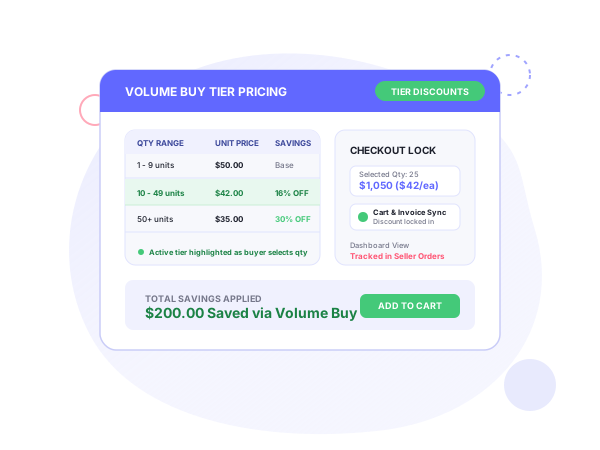
Volume Buy adds quantity-based discount tiers to AuctionWorx listings, so a buyer who takes more units pays a lower unit price. This guide covers AuctionWorx quantity tier pricing configuration, from enabling it per listing to invoicing. The add-on is described at Volume Buy tiered pricing for AuctionWorx.
The problem it addresses is fixed pricing. On a standard listing the price stays the same whatever the quantity, so nothing nudges a buyer to increase the order, and wholesale or B2B buyers have no reason to choose you. With Volume Buy the price drops automatically as quantity goes up, the discount tiers are visible, and the seller can clear deep inventory faster.
Enabling it
The seller checks “Enable Volume Buy” while creating the listing. Then the tiers are set for that listing.
Tiers
Each tier has a minimum quantity, a maximum quantity and a discounted unit price. You can add as many tiers as you need, and the rules are saved and applied to the listing straight away. Systenics’ example has one tier for 5 to 9 units at $45.00 each and an open-ended tier for 10 or more at $40.00 each. Those numbers are an illustration.
What buyers see
The listing page shows a pricing table. As the buyer changes the quantity, the active tier is highlighted and the unit price and total update in real time, so it is clear how much the next tier saves. In Systenics’ example screen a buyer enters a quantity of 12, the 10+ tier is highlighted at $40.00 each, and the total reads $480.00.
Cart, checkout and invoice
The selected tier pricing is locked in and carries through the cart and checkout. The final invoice shows the discounted unit price, so the buyer sees the saving from the listing to the invoice.
Seller dashboard
Sellers manage their discount campaigns from the seller dashboard and can track Volume Buy transactions next to their standard orders.
Who it’s for
Systenics names three groups:
- B2B and wholesale: platforms whose business buyers purchase supplies in large quantities.
- Overstock liquidators: sellers clearing warehouses of surplus stock with bulk discounts. See liquidation auctions.
- Retail marketplaces: sites that want larger consumer orders for everyday goods, by showing buyers exactly how much they save.
Systenics’ customization guide also places wholesale volume sales and liquidation marketplaces among the sites that need price mechanics beyond standard forward bidding. It names Dutch auctions as another one, covered in the Dutch auction setup guide.
Fit at a glance
| Item | Details |
|---|---|
| Edition | AuctionWorx Enterprise; Systenics’ add-ons run on an Enterprise or Events license |
| Where you turn it on | Per listing, at listing creation |
| Tier fields | Minimum quantity, maximum quantity, discounted unit price |
| Number of tiers | As many as you need |
| Buyer view | Pricing table with the active tier highlighted, unit price and total updating live |
| Order flow | Tier pricing locked through cart and checkout, discounted unit price on the invoice |
| Reporting | Volume Buy transactions tracked in the seller dashboard with standard orders |
A setup checklist
- Decide which listings carry bulk stock and are worth discounting.
- For each, tick Enable Volume Buy at creation.
- Enter tiers from the lowest quantity upward, each with its maximum quantity and unit price. Leave the top tier open-ended, as in the 10+ example.
- Open the listing as a buyer would and change the quantity to check that the right tier highlights and the total is what you expect.
- Add an item to the cart and go through checkout to confirm the invoice shows the discounted unit price.
Pricing and terms
Pricing for Volume Buy is on request: book a discovery call for a quote. Systenics’ products are sold as one-time purchases that include deployment on your AuctionWorx installation, with no subscriptions, no per-listing fees and no renewals. The prices do not include AuctionWorx itself, which RainWorx sells. Custom work outside the listed products starts with a free discovery call and a ballpark estimate, then requirements and mockups, then milestone builds. For pricing or checkout changes on your own site, see the customization service.
Systenics also lists Volume Buy alongside mobile apps, barcode listing creation, AI descriptions, Dutch auctions and WHMSPro as ways to extend AuctionWorx past the stock auction engine. It does not state a specific pairing for Volume Buy.
Frequently asked questions
Ready to build on AuctionWorx?
Book a call or send us your project details, and we'll get back to you with next steps.
